Magic
Magic
Open the Magic window by pressing 
For convenience, put spells on hotkeys. See Options: Keys 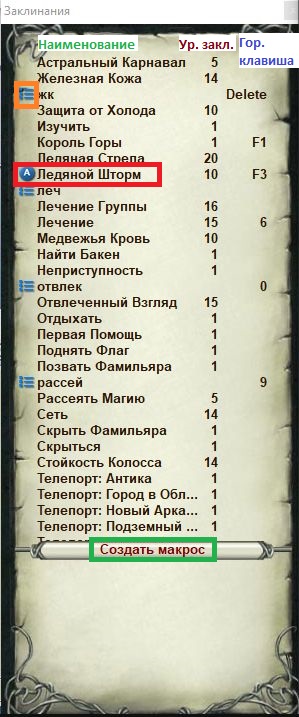
If you assign hotkeys for area combat magic and single-target magic hits or a second element, you can quickly switch the automatic combat spell with Ctrl. For example, if area magic is on 7 and single-target magic is on 8, Ctrl+7 and Ctrl+8 change the spell used automatically in combat. Chat then shows: Automatic magic set: Fire Rain.
«Automatic mode» (Auto) — this mode keeps using the selected combat spell throughout the fight whenever it is possible.
Combat spells use the current opponent as the target if nothing is selected.
The Magic window has a "Racial Trigger" option that turns the character's racial ability on or off for automatic use.

Macro
A player-made set of spells that you can start with a chosen hotkey. A macro makes combat easier: instead of pressing "Dispel Magic" every time (for example), you can run a macro with that spell by pressing one key.
- "Create macro"
- A naming window opens; choose a name for the macro.
- Pick the spell and "Add to macro" or "Add 10 to macro".
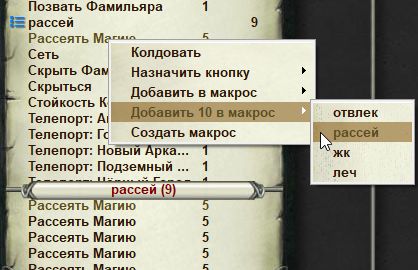
4. While the macro is running, the client shows a progress indicator: